
How to Get Your Business on Google Maps in Hyderabad — A Complete Guide for Small Business Owners
If you run a small business in Hyderabad a salon, clinic, shop, coaching center, or any local service there is one question you should be asking yourself right now:
When someone in your area searches for what you offer on Google, do they find you or your competitor?
Every single day, thousands of people in Hyderabad search things like:
- “salon near me in Kompally”
- “dentist in Secunderabad”
- “digital marketing agency in Hyderabad”
If your business is not showing up on Google Maps for these searches, you are losing customers to competitors who’s services might not be better than your’s.
The good news? Getting your business on Google Maps in Hyderabad is completely free and takes less than 45 minutes to set up. This guide walks you through every step, from creating your listing to optimizing it so you actually show up when customers search.
Why Google Maps Matters for Your Hyderabad Business
Before we get into the steps, understand why this matters so much.
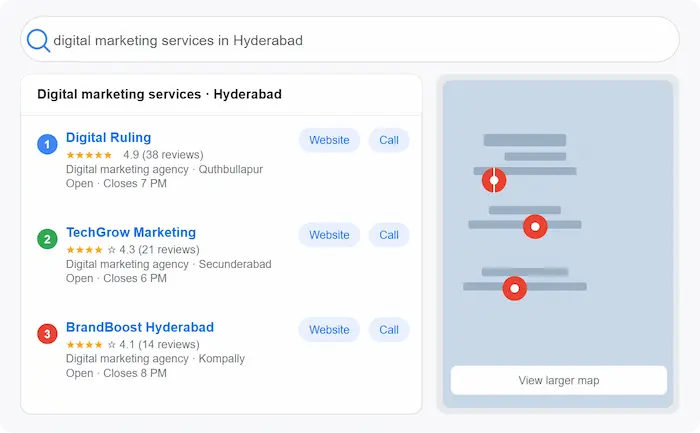
When someone searches for a local service on Google, the first thing they see is not a list of websites but, it is the Google Maps section, also called the Local Pack. This shows three businesses with their location, rating, phone number, and distance.
Studies show that over 76% of people who search for something nearby visit a business within 24 hours. In a city like Hyderabad, where local competition is high being visible on Google Maps is no longer optional. It is essential.
The tool that controls your Google Maps listing is called Google Business Profile and setting it up correctly is the single most important free marketing action any small business owner in Hyderabad can take today.
Step 1 — Create Your Google Business Profile
The first step to getting on Google Maps in Hyderabad is creating your Google Business Profile (GBP), formerly known as Google My Business.
Here is how to do it:
1. Go to google.com/business on your browser
2. Click Manage now and sign in with your Google account
3. Type your business name in the search bar. If it does not exist, click Add your business to Google
4. Choose the category that best describes your business. for example, Digital Marketing Agency, Dental Clinic, Beauty Salon, or Coaching Centre
5. Add your business location this is your physical address in Hyderabad. If you are a home-based business or serve customers at their location, you can add a service area instead
6. Add your phone number and website URL
7. Click Finish to submit your listing
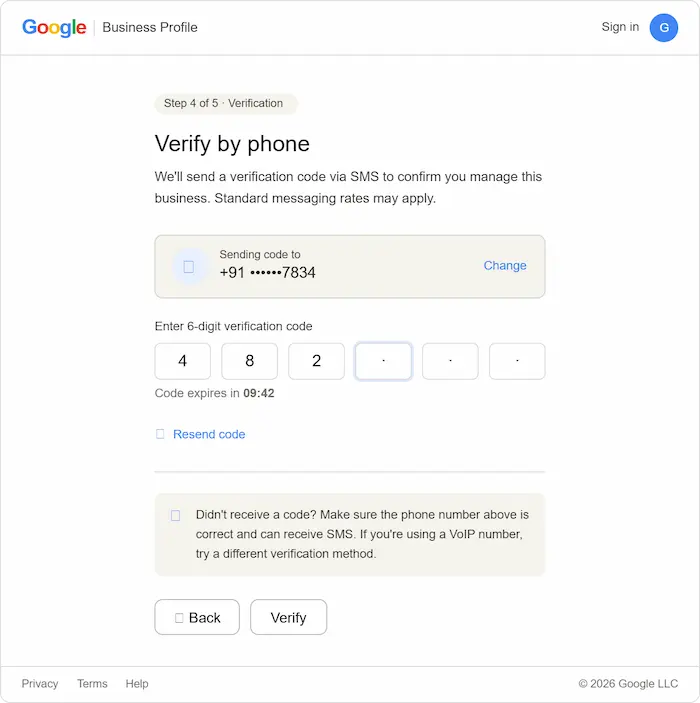
Once submitted, Google will send you a verification code usually by postcard to your address, or sometimes by phone or email.
Step 2 — Verify Your Business on Google Maps
Verification is the most important step and one many business owners in Hyderabad skip or delay which is why their listing never goes live.
Google needs to confirm that your business is real and at the location you provided. Here is what happens:
- Google sends a postcard with a 5-digit verification code to your business address usually within 5 to 14 days in India
- Once you receive it, log back into your Google Business Profile and enter the code under Verify now
- Your business will then go live on Google Maps and Search
Some accounts may be eligible for phone or email verification check if this option is available to you as it is faster.
Important: Do not edit your business name, address, or category while waiting for the verification postcard it can reset or delay the process.
Step 3 — Complete Your Business Profile 100%
Getting on Google Maps is just the beginning. Showing up when customers search for your service in Hyderabad requires a fully completed, keyword-optimised profile. Google rewards complete profiles with higher visibility.
Here is what to fill in:
Business Name
Use your real business name only. Do not stuff keywords into your business name. for example, do not write “Shiva Salon — Best Salon in Hyderabad” as your name. Google can suspend listings for this.
Business Category
Choose the most accurate primary category for your business. You can also add secondary categories. The right category is critical it tells Google what searches to show your business for.
Business Description
This is where keywords matter. Write a 250-word description that naturally includes:
- What your business does
- Who you serve
- Your location in Hyderabad
- Keywords your customers would search for
Example for a digital marketing freelancer: “Digital Ruling is a freelance digital marketing service based in Hyderabad, helping small businesses grow online through local SEO, Google Business Profile optimisation, WordPress website design, and Google Ads management. Serving small businesses, local shops, clinics, and service providers across Hyderabad “
Business Hours
Add accurate opening and closing times. Update these for holidays and festivals. Google shows “open” or “closed” in real time and customers rely on this.
Phone Number and Website
Add your primary contact number and your website URL. If you do not have a website yet, this is a strong reason to get one as it significantly improves your Google Maps ranking.
Photos
Businesses with photos receive significantly more clicks and direction requests than those without. Add:
- Your business logo
- Cover photo
- Interior and exterior photos of your shop or office
- Team photos
- Service or product photos
Aim for at least 5 high-quality photos when starting out.
Step 4 — Optimise Your Listing for Hyderabad Searches
Having a Google Business Profile is not enough on its own. To actually rank on Google Maps in Hyderabad — especially for competitive searches — you need to optimise your listing. Here is how:
Use Local Keywords Naturally
Think about what your customers actually type into Google. Someone looking for a salon in Kompally will type “salon in Kompally” or “beauty parlour near Kompally” — not just “salon”. Include these area-specific keywords naturally in your business description, service descriptions, and Google Posts.
Add All Your Services
Google Business Profile allows you to list your individual services with names, descriptions, and prices. Fill these out completely. Each service you add is another keyword opportunity that helps Google match your listing to customer searches.
Add Products if Applicable
If you sell physical products, add them to your profile with photos, descriptions, and prices. This increases your profile’s visibility significantly.
Set Your Service Area
If you serve customers across Hyderabad not just at one fixed location add your service areas. You can add specific neighborhood’s like Kompally, Secunderabad, Medchal, Quthbullapur, and Alwal.
Post Regularly on Google Business Profile
Google Posts are short updates like social media posts that appear directly on your Google listing. Post about:
- Offers and promotions
- New services
- Tips for customers
- Business updates and festival greetings
Posting at least once or twice a week signals to Google that your business is active and relevant.
Step 5 — Get Google Reviews From Your Customers
Google reviews are one of the most powerful ranking factors for Google Maps. Businesses with more reviews especially recent, positive ones — consistently outrank those without.
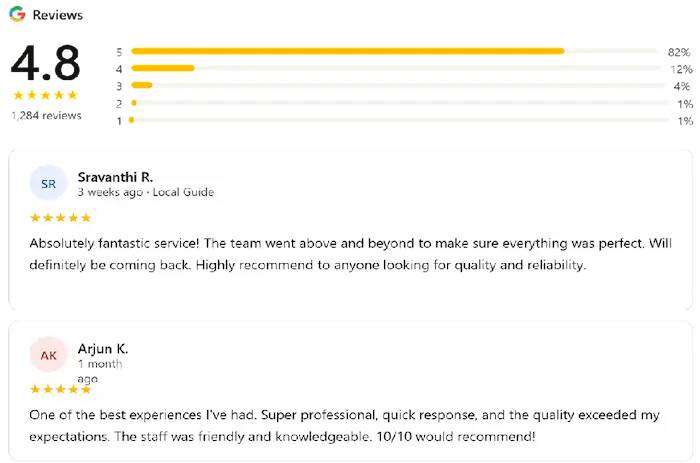
Here is how to get more Google reviews for your business:
Ask directly — after completing a service, simply ask your customer: “Would you mind leaving us a quick Google review? It really helps our small business.”
Send a WhatsApp message — share your Google review link directly on WhatsApp with a short message like: “Hi! Thank you for visiting us. If you are happy with our service, a quick Google review would mean a lot to us — here is the link.”
Put a review QR code at your reception, counter, or packaging — customers can scan it and leave a review instantly.
Always respond to reviews — whether positive or negative. Responding shows Google and customers that you are active and engaged.
Step 6 — Build Local Citations for Your Hyderabad Business
A local citation is any mention of your business name, address, and phone number on other websites. These help Google verify that your business is real and well-established in Hyderabad.
Submit your business to:
Make sure your business name, address, and phone number are exactly the same across all these platforms even small differences like “Rd” vs “Road” can confuse Google and hurt your ranking.
Common Mistakes Business Owners in Hyderabad Make on Google Maps
Avoid these mistakes that could prevent your business from showing up:
Using keyword-stuffed business names — Google can suspend your listing for this
Choosing the wrong category — this is one of the biggest reasons businesses do not show in relevant searches
Leaving the profile incomplete — no photos, no services, no description — Google ranks complete profiles higher
Ignoring reviews — not asking for reviews or not responding to them hurts your ranking
Inconsistent NAP details — different phone numbers or addresses across platforms confuses Google
Not posting regularly — an inactive profile ranks lower than an active one
How Long Does It Take to Show Up on Google Maps in Hyderabad?
After verification, your listing typically goes live within a few days. However, ranking in the top 3 results , the Local Pack for competitive searches in Hyderabad takes time and ongoing optimization.
Here is a realistic timeline:
| Timeframe | What to expect |
|---|---|
| Week 1–2 | Profile live on Google Maps after verification |
| Month 1 | Appearing for your exact business name searches |
| Month 2–3 | Ranking for low-competition local searches |
| Month 3–6 | Ranking for competitive “near me” searches in Hyderabad |
The key is consistency keep your profile updated, keep collecting reviews, and keep posting regularly.
Do You Need Help Setting Up Your Google Business Profile in Hyderabad?
Setting up and optimizing a Google Business Profile correctly takes time and knowledge of local SEO. Many small business owners in Hyderabad set it up incorrectly missing the keywords, wrong categories, or incomplete profiles and wonder why they are not showing up on Google Maps.
At Digital Ruling, I specialise in Google Business Profile setup and optimisation for small businesses across Hyderabad, national, international. I handle everything from setup and verification to keyword optimisation and ongoing management so your business shows up when customers search.
👉 Get a free consultation today — no commitment, just a clear conversation about getting your business found on Google Maps.
Getting your business on Google Maps in Hyderabad is one of the smartest and most affordable things you can do to grow your customer base. It is free, it reaches people who are actively looking for what you offer, and it puts your business in front of local customers at exactly the right moment.
Follow the six steps in this guide create your profile, verify it, complete it fully, optimise it with local keywords, collect reviews, and build citations. Do this consistently and your business will start appearing in local searches across Hyderabad within weeks.
The businesses ranking at the top of Google Maps in Hyderabad today did not get there by accident they set up their profiles correctly and maintained them. You can do the same.